
 0918006093
 Tin tức
 Khuyến mãi
 IPHONE
 IPAD
IPAD


Tải về ngay bộ nhớ Flash Firmware Stock ROM Tecno Camon 30s CLA5

Th11
Firmware Flash File (Stock ROM) của Tecno Camon 30s CLA5 là tập tin giúp khôi phục lại hệ điều hành gốc của điện thoại. Đây là công cụ hữu ích để sửa lỗi phần mềm, cập nhật phần mềm mới và khôi phục lại điện thoại về trạng thái ban đầu.

Tải firmware chính thức cho Tecno Camon 30s CLA5 miễn phí. Nếu bạn sở hữu điện thoại thông minh Tecno Camon 30s CLA5 và muốn tải firmware gốc cho nó, thì bạn đang ở đúng nơi. Chúng tôi chia sẻ firmware mới nhất cho thiết bị của bạn. Hãy làm theo hướng dẫn dưới đây để tiến hành.
Tecno Camon 30s CLA5 chạy trên hệ điều hành Android 14, được trang bị bộ xử lý Mediatek. Các tùy chọn kết nối bao gồm GPS, WIFI, Bluetooth & hotspot vv. Các cảm biến bao gồm con quay hồi chuyển, cảm biến tiệm cận, trọng lực, vv.
Liên kết Tải về
Công cụ Flash
Driver USB
Lưu ý:
- Thực hiện sao lưu trước khi tiến hành
- Nó sẽ xóa tất cả dữ liệu của bạn bao gồm bộ nhớ trong
Ưu điểm của Firmware gốc:
- Sửa lỗi phần mềm
- Sửa lỗi bootloop, unbrick
- Sửa lỗi khởi động, khôi phục chết
- Bỏ qua khóa mẫu, pin mật khẩu
- Bỏ qua frp/ khóa tài khoản Google Gmail
Cách Cài đặt Stock ROM TRÊN Tecno Camon 30s CLA5
- Tải về & Giải nén Firmware
- Cài đặt Driver USB Mediatek trên máy tính của bạn
- Mở tệp SPFlashToolV6.exe.
- Trong tab Tải xuống, Nhấp vào ‘chọn’ duyệt và chọn tệp scatter từ Firmware đã tải về
- Lặp lại quy trình, duyệt và chọn tệp auth
- Trong menu thả xuống chọn Chỉ tải về
- Nhấp vào nút ‘Tải về’ để bắt đầu quá trình flash
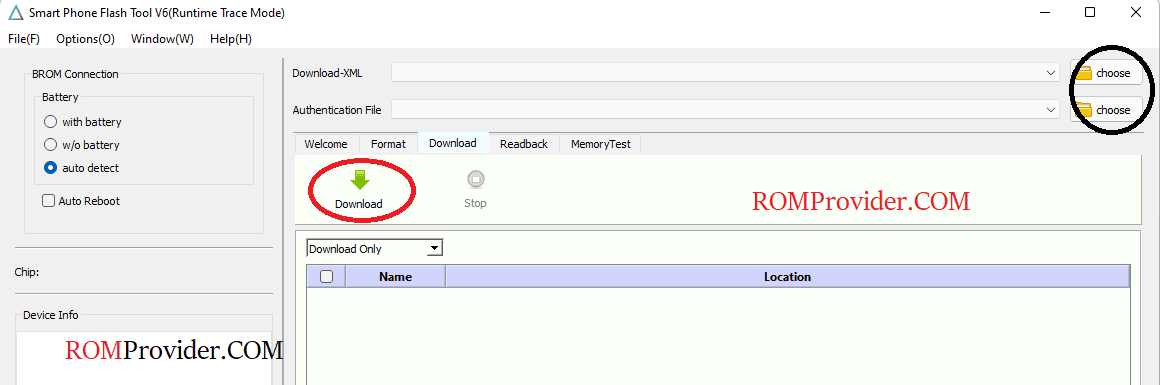
- Tôi giả định rằng thiết bị đã được kết nối, chúng tôi kết nối nó trong quá trình Vô hiệu hóa SLA. Nếu thiết bị chưa kết nối, giữ nút tăng giảm âm lượng và kết nối (đảm bảo nó ở chế độ tắt nguồn, chúng tôi cần chế độ preloader hoặc brom)
- Giám sát quá trình flash
- Khi quá trình flash hoàn tất, thiết bị sẽ khởi động lại
Liên quan:
Download official stock firmware for the Tecno Camon 30s CLA5 for free. If you own a Tecno Camon 30s CLA5 smartphone and want to download the stock ROM for it, then you are in the right place. here we share latest firmware for your device. follow the guide below to proceed.
The Tecno Camon 30s CLA5 runs on Android 14 operating system, powered by a Mediatek processor. connectivity options include GPS, WIFI, Bluetooth & hotspot etc. Sensors include gyroscope, proximity, gravity, etc.
Download Links
Flash Tools
USB Driver
Note:
- Make a backup before process
- it will erase all your data Including Internal storage
Advantage of Stock Firmware:
- fix software glitch
- unbrick, bootloop fix
- dead boot repair
- pattern, pin password lock bypass
- frp bypass/ google gmail account lock bypass
How to Install Stock ROM ON Tecno Camon 30s CLA5
- Download & Extract Firmware
- Install Mediatek USB driver on your computer
- Open the SPFlashToolV6.exe.
- In the Download tab, Click ‘choose‘ browse and select scatter file from Downloaded firmware
- Repeat the process, browse and select auth file
- In the drop down menu select Download only
- Click ‘Download‘ button to start the flashing process
- I am assuming that the device already connected, we connect it during the SLA Disable Process. if the device not connected, hold volume up down button and connect it (make sure it’s in power off mod, we need preloader or brom mod)
- Monitor flashing process
- once flashing complete ,the device start itself.
Related: