
 0918006093
 Tin tức
 Khuyến mãi
 IPHONE
 IPAD
IPAD


Hướng dẫn nhận biết và cài đặt chính xác dịch vụ Google Play

Th12
Hướng dẫn nhận diện và cài đặt đúng Dịch vụ Google Play –
Dịch vụ Google Play rất quan trọng để nhiều ứng dụng hoạt động, không chỉ là ứng dụng của Google mà còn là các ứng dụng Android khác phụ thuộc vào Dịch vụ Google Play để hoạt động chính xác, như Snapchat và các ứng dụng có quyền truy cập vào dịch vụ quảng cáo hoặc dịch vụ vị trí. Tuy nhiên, những dịch vụ này được cài đặt sẵn trên các thiết bị Android. Một số công ty điện thoại như Huawei với firmware Trung Quốc không có chúng. Vì vậy, bạn phải cài đặt chúng thủ công. Vấn đề là phải nhận diện phiên bản và cài đặt dịch vụ Google Play đúng trên thiết bị Android của bạn. Hướng dẫn này sẽ bao gồm tất cả những gì cần thiết để đảm bảo bạn tải xuống và cài đặt phiên bản đúng trên điện thoại của bạn.
Chính phủ Trung Quốc đã cấm các kênh truyền thông xã hội như Facebook, Instagram và Twitter vì lý do an ninh. Họ lo lắng về quyền riêng tư dữ liệu và tin rằng tình báo có thể truy cập vào tất cả dữ liệu trên tài khoản mạng xã hội. Vì vậy, họ đã cấm hầu hết chúng trong nước, bao gồm Google Play Store, các ứng dụng Google khác và dịch vụ Google Play. Vì vậy, nếu bạn có điện thoại từ Trung Quốc, có thể bạn không có các ứng dụng và dịch vụ của Google.
Ngoài các hạn chế của chính phủ, một số firmware không có Gapps được cài đặt sẵn; bạn phải tự flash Gapps (Google Apps) trên điện thoại hoặc thiết bị Android của bạn. Ngoài ra, với lệnh cấm mới của Hoa Kỳ đối với Huawei, họ không thể sử dụng các ứng dụng hoặc dịch vụ của Google trên điện thoại của họ.
#Dịch_vụ_Google_Play #Hướng_dẫn_cài_đặt #Phiên_bản_đúng #Thiết_bị_Android
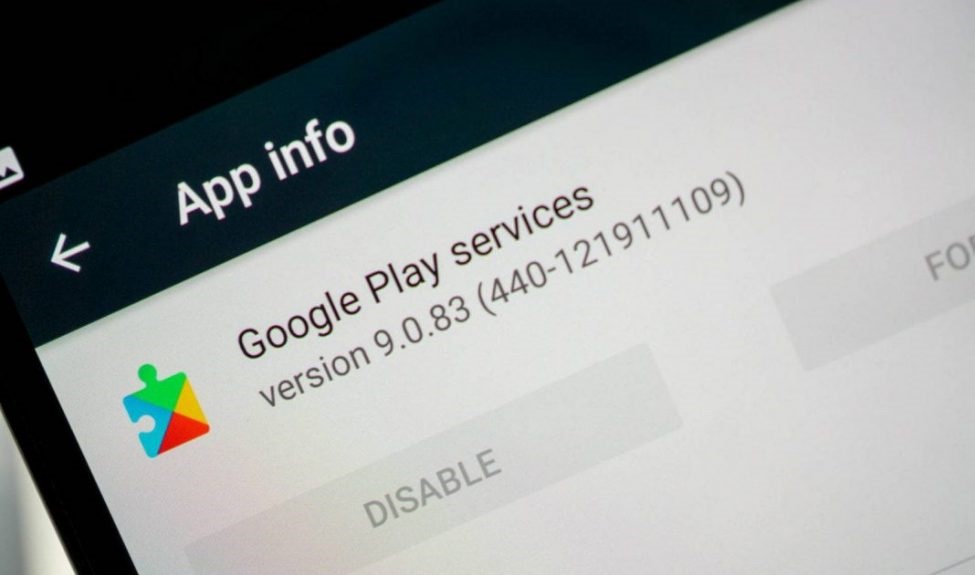
Google Play services are essential for many apps to run, not only Google apps but also other Android apps dependent upon Google Play services for proper function, like Snapchat and apps with access to ad services or location services. However, these services are pre-installed on Android devices. Some phone companies like Huawei phones with Chinese firmware do not have them. So, you have to install them manually. The problem is identifying the version and install correct Google Play services on your Android device. This guide will cover everything required to ensure you download and install the correct version on your phone.
The Chinese government has banned social media channels like Facebook, Instagram, and Twitter for security reasons. They are concerned about data privacy and believe that intelligence can access all the data on social media accounts. So they have banned most of them in their country, including Google Play Store, other Google apps, and Google Play services. So, if you have got your phone from China, you might not have Google apps and services.
Apart from government restrictions, some firmware does not have pre-installed Gapps; you must manually flash the Gapps (Google Apps) on your Android phone or device. Also, with the new US ban on Huawei, they cannot use Google apps or services on their phones.
Guide to Identify and Install correct Google Play Services on Android Device:
I can not give you a specific version of Google Play Services according to your phone, as each month or so, Google regularly releases new versions of Google Play services, and then the old one does not work on your Android phone. So, you need to figure out which version your device supports. If you have issues identifying the correct version of Google Play services for your phone, you can contact me on Facebook or use the Contact Us form below to contact me. I will try my best to help you out.
In this guide, I will lead you to the most famous repository of Google Play services, from where you can download the correct version of Google Play services for your phone.
Guide to Identify, download and install correct Google Play Services on Android devices that do not have them pre-installed:
First, you need to know a few things about your Android phone:
- It is an Android OS version. For example, it is running on Android 6.0.1 Marshmallow. You can see this in Settings -> About Phone -> Software Information.
- You also need to know the Architecture of your phone. Here is a complete guide that will help you figure out the Architecture of your phone, for example, Arm or Arm64.
- Before downloading the Google Play Store APK: DPI, you need to know another thing. Although not essential, you can install any APK with a universal or no DPI. Also, you can use the above guide, which includes an app called Droid info, which helps you figure out the DPI of your phone.
Once you have all this information, go to this link, a world-famous and secure repository of Google Play Services, and identify the correct APK for your phone.
It would be best to consider the following things in the above repository before downloading any APK. First, before downloading, see the first three numbers in the parenthesis “()” in the file name of each Google Play Services APK.
- The first number represents the Android version your phone is running on.
- 0 for Android <5.0
- 2 for Android 5.0 and 5.1, starting with Play Services v8
- Four for Android 5.0, 5.1, and Android 6.0 and above.
- 5 for Android Wear
- 7 for Android 5.0
- 8 for Android TV
- 9 for Android 8.0+
- The second number represents your phone architecture, i.e., ARM or ARM64.
- 1 for armeabi
- 3 for armeabi-v7a
- 4 for arm64-v8a
- 5 for MIPS
- 7 for x86
- 8 for x86_64
- The third number represents the dpi of the APK file.
- 0 for universal nodpi
- 2 for 160
- 4 for 240
- 6 for 320
- 8 for 480
For example, if you have a Huawei Honor 4C on Android 6.0.1. You will download the Google Play Services APK with code (440).
Note: If you don’t understand how to install your phone’s correct version of Google Play Services. Head to the website linked above; next to each Google Play service APK, you will see all the information about that APK, like which Android version it is suitable for and what dpi it supports.
How to install Google Play Services on your Android Phone:
Once you have downloaded the correct Google Play Services file, it is time to install it.
- First, enable “Unknown Sources” from your phone’s Security settings.
- On your phone: Go to Settings -> Advanced Settings ->Security ->Enable Download from Unknown Sources. (The settings menu where you can find this feature might differ according to the phone model and make.)
If you see a message warning that ‘this type of file can harm your device.’ You can ignore it (it is safe) and tap OK. - Now locate the downloaded Google Play Services APK file using the file manager on your phone.
- Open the APK file and permit it to install on your phone.
Once installed, all the apps dependent on Google Play Services, like Snapchat and Maps, will work fine on your phone. Please contact me if you have issues identifying, downloading, and installing the correct Google Play services on your Android phonech with me. I will try my best to help you out.
[ad_2]
