
 0918006093
 Tin tức
 Khuyến mãi
 IPHONE
 IPAD
IPAD


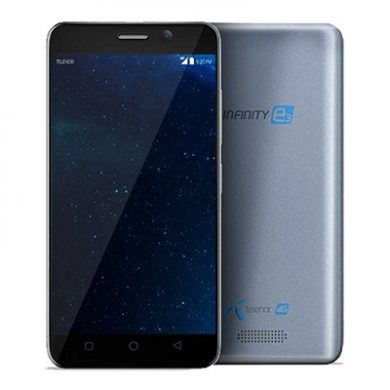
Cách cài đặt Firmware gốc trên Telenor Infinity E3 mang tính nhập vai
Th1
Cách cài đặt firmware gốc trên Telenor Infinity E3
Tải Firmware/Flash File chính thức của Telenor Infinity E3:
Tải Firmware chính thức/Flash File cho Telenor Infinity E3 nếu bạn sở hữu điện thoại thông minh Telenor Infinity E3 và bạn muốn tải ROM/Flash File/Stock cho nó thì bạn đang ở đúng nơi, bạn phải làm điều này bằng cách làm theo hướng dẫn dưới đây.
Trong một số trường hợp khi chúng ta đã “briked” thiết bị, sau đó chúng ta có thể đưa điện thoại trở lại (Unbrick) bằng firmware gốc. Ngoài ra, nếu bạn cảm thấy chiếc điện thoại Telenor Infinity E3 của bạn bị giật hoặc gặp vấn đề, hãy flash Firmware từ danh sách dưới đây và tránh khỏi tình huống này. Firmware gốc không làm mất bảo hành cho điện thoại Telenor Infinity E3 của bạn.
Điện thoại thông minh Telenor Infinity E3 chạy trên hệ điều hành Android 7.0 được trang bị bộ xử lý Mediatek MT6737. Telenor Infinity E3 là điện thoại thông minh 2 SIM (GSM và GSM) chấp nhận SIM Nano-SIM và Nano-SIM. Tùy chọn kết nối bao gồm Wi-Fi, GPS, Bluetooth, USB OTG, FM, 3G.
Telenor Infinity E3 đi kèm với 2GB RAM và 16GB bộ nhớ có thể mở rộng thông qua thẻ SD.
Lưu ý:
1. Flash ROM sẽ xóa tất cả dữ liệu cá nhân của bạn bao gồm lưu trữ. Vì vậy, chúng tôi khuyên bạn nên đầu tiên sao lưu hoàn toàn điện thoại của bạn.
2. Hãy cẩn thận, chúng tôi không chịu trách nhiệm về bất kỳ hỏng hóc nào cho thiết bị của bạn.
3. Hãy sao lưu NVRAM trước khi làm bất loại điều gì.
4. Đảm bảo rằng điện thoại của bạn ít nhất 50% pin trong quá trình flash để ngăn ngừa tắt ngẫu nhiên.
Cần thiết:
1. Backup NVRAM
2. Tạo một bản sao lưu nandroid
3. Sao lưu dữ liệu cá nhân của bạn
Thông tin Firmware:
– Tên sản phẩm: Telenor Infinity E3
– Loại: ROM đủ
– Kích thước: 1 GB
– SoC: Mediatek MT6737
– Hệ điều hành: Android 7.0
– Mật khẩu: Null
– Truy cập root: Không
– Gapps: Đã bao gồm
– Phiên bản sản phẩm: MT6737M_TELENOR__Infinity_e3_7.0_C516D_C516D1
Tải về:
Firmware Telenor Infinity E3: Tải về.
Công cụ flash:
Driver:
– Mediatek Preloader V-COM Driver: Tại đây
Cách cài đặt Firmware Stock Flash Telenor Infinity E3:
1. Tải và cài đặt Mediatek Vcom Driver trên PC của bạn.
2. Tải và trích xuất SP Flash tools trong một thư mục. Chạy SP Flash tools.exe
3. Điều hướng đến tab Download, nhấp Scatter và Load Scatter File từ thư mục ROM
Chi tiết hơn với hình ảnh:
– Đối với công cụ flash, làm theo hướng dẫn này: Tại đây
– Đối với cập nhật OTA, làm theo hướng dẫn này: Tại đây
Vậy là một hướng dẫn hoàn chỉnh để tải về Firmware và Flash cho thiết bị này. Nếu bạn có bất kỳ câu hỏi nào, hãy cho chúng tôi biết qua ý kiến của bạn.
Đăng này ban đầu xuất hiện tại romprovider.com.
Download Stock Firmware/Flash File Telenor Infinity E3:
Download Official Stock Firmware Flash File For Telenor Infinity E3 If you own Telenor Infinity E3 Smartphone and You want to Download the Stock ROM /Flash File/For it then You are on a Correct Place, You have to do this by following the Below Guide.
In Some cases When We have bricked our device, then we can bring back the phone (Unbrick) using the stock firmware. Also if You feel Your Telenor Infinity E3 lag or has an issue, then flash the Stock Firmware From the list below and save from situation. Stock Firmware doesn’t void a warranty on Your Telenor Infinity E3.
Telenor Infinity E3 Smartphone is Run on android 7.0 OS Which is Powered by a Mediatek MT6737 Processor. the Telenor Infinity E3 is a dual SIM (GSM and GSM) smartphone that accepts Nano-SIM and Nano-SIM. Connectivity options include Wi-Fi, GPS, Bluetooth, USB OTG, FM, 3G.
The Telenor Infinity E3 is Come With android 2GB of RAM and 16GB of Storage Can be expandable via SD Card.
Note-
1. Flashing the ROM Will Erase all Your Personal Data including Storage. So we advice You to First take a Complete backup of your Phone.
2. Please Do carefully, We are Not Responsible for any Damage to Your Device.
3. Must backup NVRAM using this Guide before Doing anything.
4. Ensure that Your Device at-least 50% Charge During Flashing Process to Prevent accidental Shut Down.
Must Require:
1. backup NVRAM
2. Create a nandroid backup
3. backup Your Personal data
Firmware information:
Product name: Telenor Infinity E3
Type: Full ROM
Size: 1 GB
SoC: Mediatek MT6737
Os: Android 7.0
Password: Null
Root access: Not
Gapps: Included
Product Version: MT6737M_TELENOR__Infinity_e3_7.0_C516D_C516D1
Download :
- Firmware Telenor Infinity E3 : Download
Flash Tools:
Driver:
- Mediatek Preloader V-COM Driver Here
How to Install Stock Firmware Flash Telenor Infinity E3:
- Download and Install Mediatek Vcom Driver on Your PC.
- Download & Extract SP Flash tools Inside a Folder. Run SP Flash tools.exe
- Go to Download tab Click Scatter and Load Scatter File from ROM Folder

- Select Download Only. Click Download & Connect Your Switched off Phone.

- You can see Flashing Process On Screen. after Complete unplug & Switch it On
Detailed Guide With Images:
Read also:
- How to unlock Bootloader
- How to Repair IMEI Number
- Google Camera 6.1 Working HDR Plus Portrait Mod Slow Motion
So this is a Complete Guide to Download Firmware and Flash This Device. if You have any question Let Me Know via Comment.