
 0918006093
 Tin tức
 Khuyến mãi
 IPHONE
 IPAD
IPAD


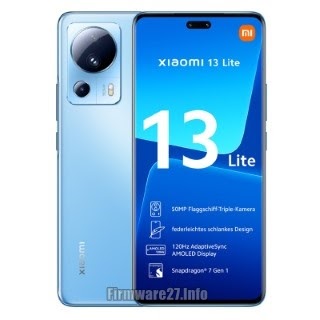
Tải về ROM gốc Xiaomi 13 Lite (Ziyi) – Khám phá bí mật flash file
Th8
Tải xuống Xiaomi 13 Lite (Ziyi) Stock ROM (Flash File)
Xiaomi 13 Lite (Ziyi) Official Miui Rom để sửa chữa thiết bị của bạn nếu bạn gặp phải hiện tượng bootloop, lỗi hệ thống, Unbrick chết sau khi flash, Khóa màn hình, Khóa mẫu, Đặt lại Mi Cloud, FRP / Tài khoản Google, treo và sự cố chết. Flash firmware rom bằng công cụ miflash hoặc ứng dụng updater.

Xiaomi 13 Lite (Ziyi) Recovery ROM
| MIUI | Android | Khu vực | Kích thước | Link tải |
|---|---|---|---|---|
| V14.0.3.0.TLLEUXM | 13 | EEA | 5.0 GB | Tải về |
| V14.0.8.0.SLLEUXM | 12 | EEA | 4.7 GB | Tải về |
| V14.0.1.0.SLLMIXM | 12 | Toàn cầu | 4.6 GB | Tải về |
| V14.0.1.0.SLLRUXM | 12 | Nga | 4.6 GB | Tải về |
Xiaomi 13 Lite (Ziyi) Fastboot ROM
| MIUI | Android | Khu vực | Kích thước | Link tải | |||||||||||||||||||||||||||||||||||||||||||||||||||||||||||||||||||||||||||||||||||||||||||||||||||
|---|---|---|---|---|---|---|---|---|---|---|---|---|---|---|---|---|---|---|---|---|---|---|---|---|---|---|---|---|---|---|---|---|---|---|---|---|---|---|---|---|---|---|---|---|---|---|---|---|---|---|---|---|---|---|---|---|---|---|---|---|---|---|---|---|---|---|---|---|---|---|---|---|---|---|---|---|---|---|---|---|---|---|---|---|---|---|---|---|---|---|---|---|---|---|---|---|---|---|---|---|---|---|---|
| V14.0.3.0.TLLEUXM | 13 | EEA | 7.3 GB | Tải về | |||||||||||||||||||||||||||||||||||||||||||||||||||||||||||||||||||||||||||||||||||||||||||||||||||
| V14.0.8.0.SLLEUXM | 12 | EEA | 6.8 GB | Tải về | |||||||||||||||||||||||||||||||||||||||||||||||||||||||||||||||||||||||||||||||||||||||||||||||||||
| V14.0.1.0.SLLMIXM | 12 | Toàn cầu | 6.9 GB | Tải về | |||||||||||||||||||||||||||||||||||||||||||||||||||||||||||||||||||||||||||||||||||||||||||||||||||
| V14.0.1.0.SLLRUXM | 12 | Nga | 6.4 GB |
| MIUI | Android | Region | Size | Link |
|---|---|---|---|---|
| V14.0.3.0.TLLEUXM | 13 | EEA | 5.0 GB | Download |
| V14.0.8.0.SLLEUXM | 12 | EEA | 4.7 GB | Download |
| V14.0.1.0.SLLMIXM | 12 | Global | 4.6 GB | Download |
| V14.0.1.0.SLLRUXM | 12 | Russia | 4.6 GB | Download |
Xiaomi 13 Lite (Ziyi) Fastboot ROM
| MIUI | Android | Region | Size | Link |
|---|---|---|---|---|
| V14.0.3.0.TLLEUXM | 13 | EEA | 7.3 GB | Download |
| V14.0.8.0.SLLEUXM | 12 | EEA | 6.8 GB | Download |
| V14.0.1.0.SLLMIXM | 12 | Global | 6.9 GB | Download |
| V14.0.1.0.SLLRUXM | 12 | Russia | 6.4 GB | Download |
How To Flash Xiaomi 13 Lite (Ziyi) Updater App
- Download the recovery rom,and copy to /sdcard/downloaded_rom folder on your phone
- Launch Settings on your phone
- Select About phone
- Click System update then click the three dots icon at the top-right corner of your phone screen
- Select choose update package
- From the file manager, choose the Recovery ROM zip file that you’ve already downloaded and copied to downloaded_rom folder
- Once you have downloaded the ROM file, your device will start upgrading.
- Your device should automatically boot to the new version when the update is completed.
- Done
How To Flash Xiaomi 13 Lite (Ziyi) Via MiFlash Tool
- Download Xiaomi MiFlash tool and extract to the computer
- Extract fastboot rom you have already downloaded. If the downloaded firmware file extension is “.gz“, rename it to “.tgz“.
- Turn off your phone.
- Now press Volume down and Power button at the same time to boot Fastboot mode.
- Once in fastboot mode, connect the device to Computer via USB cable
- Launch MiFlash.exe tool and click refresh to make sure your phone connects correctly to the computer
- Paste the firmware folder path in the box after “select” button in MiFlash tool
- Once you have confirmed that everything is in order, and you have followed the steps carefully- click the flash button. Ensure that clean all is selected before you flash.
- Wait patiently and do not disconnect your phone from the Computer until the flashing progress bar turns green and indicate a success message
- Done
Disclaimer:
Don’t forget backup all data and files on your phone before flashing or installing the stock rom. As this helps you to recover the personal data whenever any thing wrong happens. All the risks we are not responsible.
KẾT LUẬN Tải về Xiaomi 13 Lite (Ziyi) ROM gốc (flash file)
Xiaomi 13 Lite (Ziyi) Recovery ROM
| MIUI | Android | Khu vực | Kích thước | Liên kết |
|---|---|---|---|---|
| V14.0.3.0.TLLEUXM | 13 | EEA | 5.0 GB | Tải về |
| V14.0.8.0.SLLEUXM | 12 | EEA | 4.7 GB | Tải về |
| V14.0.1.0.SLLMIXM | 12 | Toàn cầu | 4.6 GB | Tải về |
| V14.0.1.0.SLLRUXM | 12 | Nga | 4.6 GB | Tải về |
Xiaomi 13 Lite (Ziyi) Fastboot ROM
| MIUI | Android | Khu vực | Kích thước | Liên kết |
|---|---|---|---|---|
| V14.0.3.0.TLLEUXM | 13 | EEA | 7.3 GB | Tải về |
| V14.0.8.0.SLLEUXM | 12 | EEA | 6.8 GB | Tải về |
| V14.0.1.0.SLLMIXM | 12 | Toàn cầu | 6.9 GB | Tải về |
| V14.0.1.0.SLLRUXM | 12 | Nga | 6.4 GB | Tải về |
Cách để nạp Xiaomi 13 Lite (Ziyi) bằng Ứng dụng Updater